With the router hardware complete, it’s time to move onto the software. But even before that I need to lay out what the network is going to look like as that drives the actual router configuration.
I’m planning to use a zone based system layout and segment the network into 8 different zones: WAN, LAN, Guest, Media/IoT, Cameras, Management, External, and Local.
Here’s a high level block diagram of what I’m working with.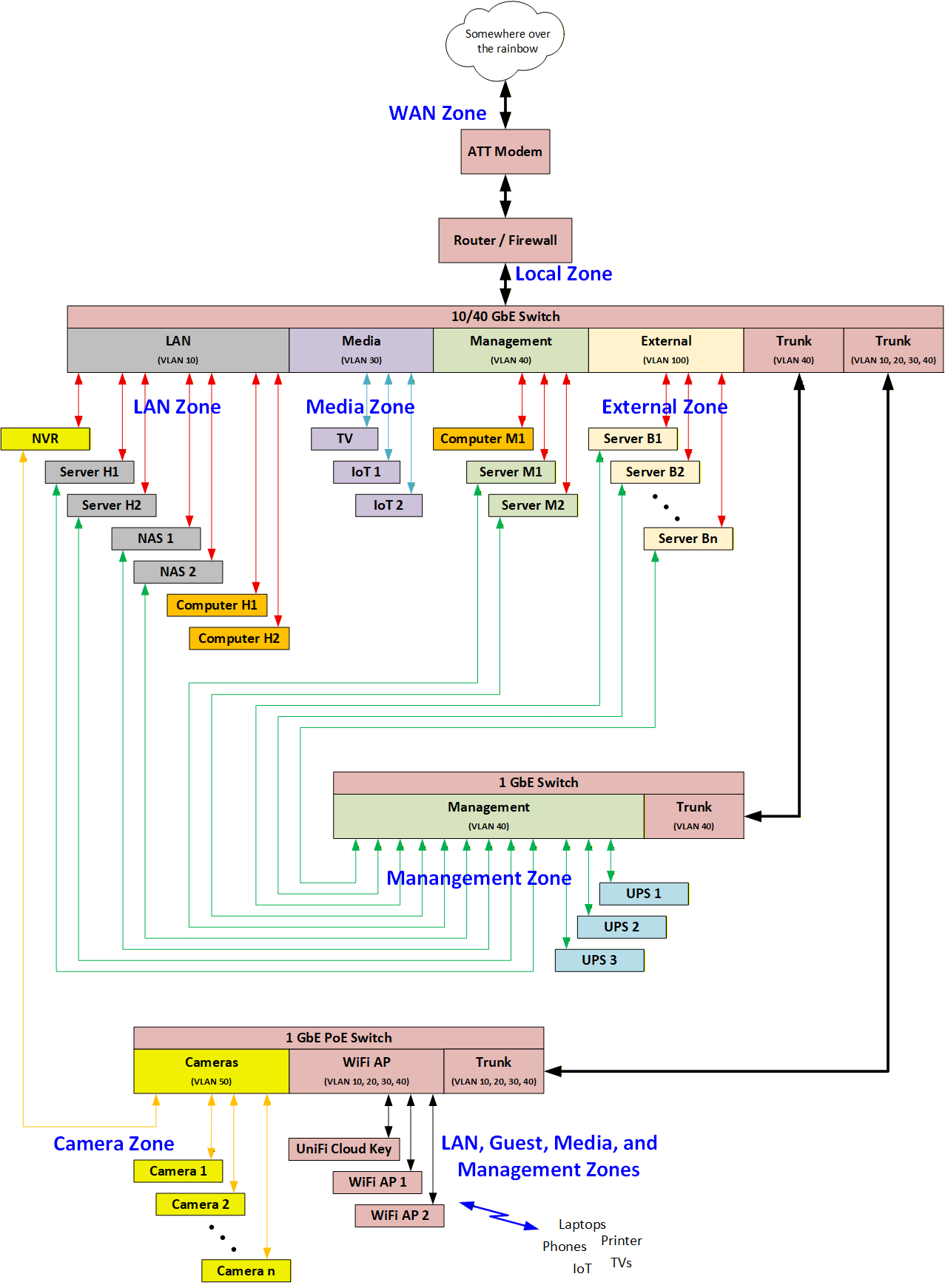
And here’s a short explanation of each:
The LAN zone (VLAN 10) is where most things on my network live. All the family internet access (phones, computers, laptops, printer) along with both NAS’s, NVR, DNS, etc.
The Guest zone (VLAN 20) is separate from the rest of the network. You can only connect to it via WiFi and it will be rate limited. DNS queries will be pushed to the DNS server on VLAN10. Beyond that it will have no access to anything else on the local network.
The Media zone (VLAN 30) is used to keep somewhat insecure devices (TV’s, IoT, etc.) separate from the rest of the network. Like the guest zone, DNS queries will be pushed to the DNS server on VLAN10. Beyond that it will have no access to anything else on the local network.
The management zone (VLAN 40) is for connections that are used to monitor and maintain the rest of the network such as server IPMI’s, UPS’s, a few homelab servers and projects. It has access to all of the other VLAN’s but only devices on LAN can access devices located on it and then only thru credentialled devices or services.
The Camera zone (VLAN 50) is totally separated from the rest of the network. It will only have an assigned VLAN because it physically resides on a switch that has other VLANs, so in order to maintain the separation it too must have an assigned VLAN. This VLAN does not touch the router, so no firewall rules need to be created for it. I include it in the table for completeness.
The External zone (VLAN 100) is basically a DMZ that is used for my business. It will have no direct connection to the rest of the network. It will only be accessible from either the LAN or from the Management zones. It will not use the local DNS server on LAN but will instead use Cloudflare’s 1.1.1.1 and Quad9’s 9.9.9.9 directly. 1
The Local zone is the router itself. It will only be accessible from the Management zone, and then only from credentialled devices.
In the next post, I’ll walk through how this is to be implemented in the router.
Thanks for reading, and as always comments and questions are welcome.
Comments
Loading comments…