

In my last post I said “Unless something goes awry, the plan is…” Well… it went awry.
First, I couldn’t find a decent place to mount the RTL8126 connector on the front panel without adding a longer ribbon cable between the NIC mounted in the M.2 slot and the connector on the front panel which would not be a good idea at 5GbE.
Second (and more importantly), I could not get the RTL8126 driver built into the VyOS ISO. After several days trying too many different ways to do so, I decided I had to come up with something different.
Trying to use an out-of-tree driver was not a good idea on my part. While I could manually install it after VyOS was installed on one of my test systems, I could not get it to be part of the ISO. And this means that it’s going to be a maintenance issue in the long run. Best to have everything in the development tree. There is also another concern that I didn’t realize at the time: The RTL8126 NIC does not support any hardware offloading. Not a big issue, but definitely something I’d like to have the option to explore. 1
So now what? My backup plan was to give up the 40GbE NIC in favor of a dual 10GbE NIC and use an SFP+ copper adapter that could run at 5GbE. But I really don’t want to give up on the 40GbE connection from the router to the switch just yet. And after quite a bit of searching, reading and banging my head on the wall I found this: a QSFP+ to 10GbE SFP+ adapter.
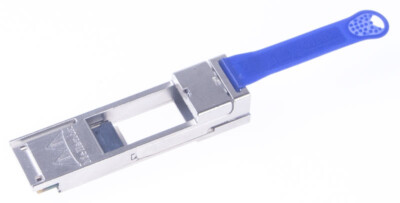
Now you might be saying “Duh”, but this is new to me and I’m hoping I can cascade it with the 5GbE copper SFP+ adapter.
So as of me writing this, the plan is to use a MCX354 dual QSFP+ NIC in the PCI_E1 slot. One port will attach to the switch via a 40GbE DAC cable, while the other port will connect to the modem with a Mellanox 655874-B21 adapter and a 10/5GbE copper SFP+ adapter plugged into that. This should work well, but I’ll have to test this to be sure. On to more of the hardware issues and honestly these are all caused by my own foibles.
- Foible 1. I like my networking equipment to have all the networking connections on the front and all the power connections on the back. Including servers. I have a few exceptions, but where possible this is high on my wish list.
- Foible 2. I like everything (again, when possible) to be 1U tall and have a short depth chassis. This is mainly due to not having an actual 19in rack but rather a system that mounts directly to the wall using shelf rails. I’ll show this later when I get to mounting all the new stuff. FYI, the SX1024 switch coming in at 16in deep is a bit of a stretch that I’m going to have to address.
Ultimately, I want this router to follow these two foibles and so I thought I’d use a Supermicro SC513 chassis that I had. I picked up 3 of these crazy cheap several years back and this one has been sitting on a shelf ever since. However, the B550 being a desktop MB and the SC513 being a sever chassis, things don’t exactly go together the way one would like them to with the biggest issues being:
- The IO connectors on the MB do not line up to the connector openings in the chassis.
- The Voltage Regulator heatsink and Audio IO on the MB are too tall.
- The air flow for the MB is all wrong for a server chassis.
For 1 & 2, I plan to modify the chassis IO openings, remove the audio IO jacks from the MB, and cut the VR heatsink to fit the chassis. What? Why? Yeah, it’s a bit of a drastic solution, but I’ll do it in a smart way that doesn’t affect performance. I want what I want.
Why is the air flow wrong? It’s the difference between the design of a desktop MB and a server MB. In a 1U server chassis, the memory is usually perpendicular to the back of the chassis and located to the side of the CPU. Air is pushed from the back to the front through the CPU separate from the memory. On a desktop MB the memory sticks are usually parallel with the back of the case between the back and the CPU. Air is pushed over the memory through a much taller CPU cooler (air not water here). Putting a desktop MB in a 1U server chassis means that the air flow to the CPU is significantly blocked by the memory. To fix the air flow issues, I’ll just do the best I can to direct the air around the memory. All of this will have to be figured out once I get the MB mounted in the chassis.
Thanks for reading, and as always, comments and questions are welcome.
Comments
Loading comments…