

Where getting 10Gb/s was a breeze, 40Gb/s was bit more of a challenge. I started off with the same basic configuration that I used for testing 10Gb/s, just replacing the NIC’s and DAC cables with the 40GbE versions.
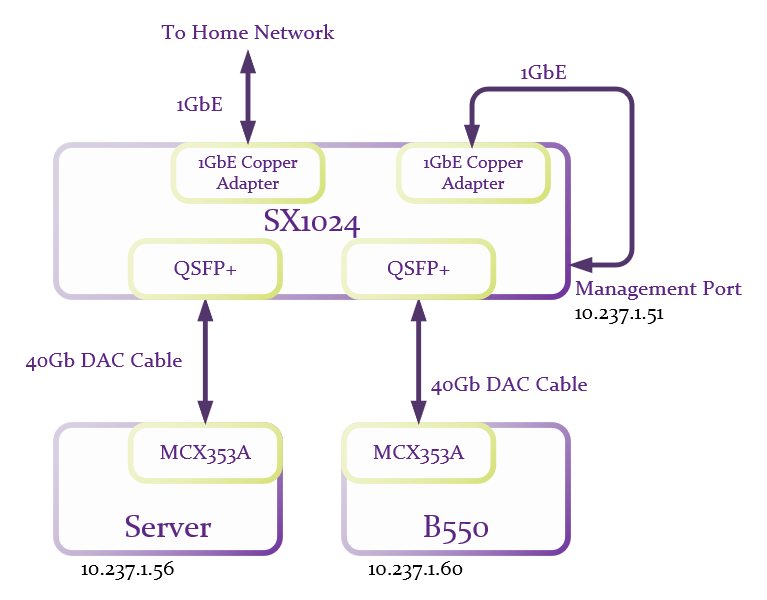
And after verifying that everything was still able to talk to each other, I fired up iperf3:
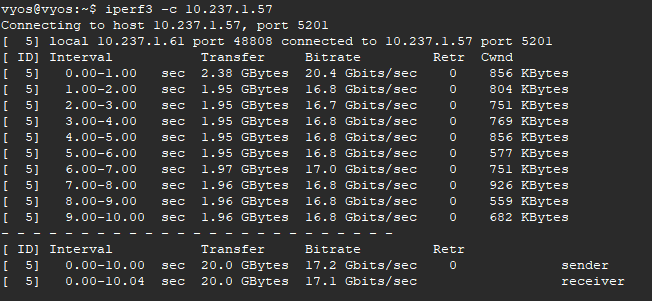
Well, that’s a bit disappointing, but not unexpected as I’ve read several places online that low 20Gb/s-ish is the best most are able to get without a bit of tweaking. And in regards to tweaking, there’s are really good discussions at Fasterdata and Nvidia which I basically copied. My approach was to throw the kitchen sink at it so I added the following to /etc/sysctl.conf:
# increase TCP max buffer size setable using setsockopt() to 256MB
   net.core.rmem_max = 268435456
   net.core.wmem_max = 268435456

# increase Linux autotuning TCP buffer limit to 128MB
   net.ipv4.tcp_rmem = 4096 87380 134217728
   net.ipv4.tcp_wmem = 4096 65536 134217728

# don't cache TCP metrics from previous connection
   net.ipv4.tcp_no_metrics_save = 1

# If you are using Jumbo Frames, also set this
   net.ipv4.tcp_mtu_probing = 1

# recommended to enable 'fair queueing' (fq or fq_codel)
   net.core.default_qdisc = fq

# from nvidia
   net.ipv4.tcp_low_latency=1
   net.ipv4.tcp_timestamps=0
   net.ipv4.tcp_sack=1
   net.core.netdev_max_backlog=250000
Follow this with:
sysctl -pto pickup the changes. And add:
cpupower frequency-set -g performancebecause Linux does not pick this by default.
iperf3 again and rates were in the 24-25Gb/s range. Sorry, I forgot to get a screen grab of so you’re going to have to trust me on this. I then started playing around with parallel streams which leads me to believe that 12 streams is optimal for my setup:
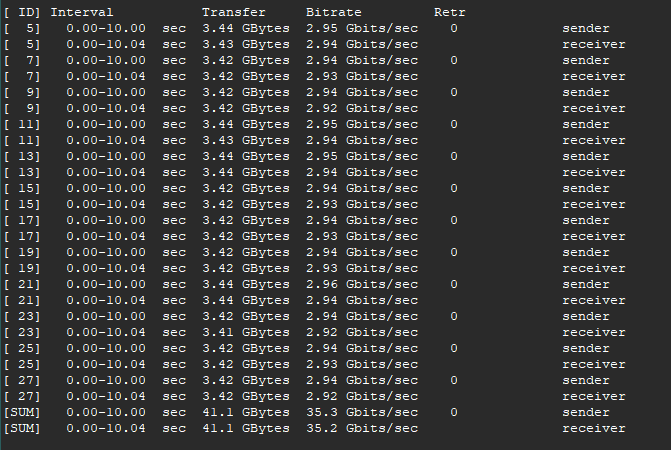
Much better now, but I still think I can do better. However, nothing I tried improves things. Reading back through all the info on Fasterdata I see that it might be that the CPU core is overloaded and you can check with:
mpstat -P ALL 1Sure enough, my server is saturating the core being used for networking. A lot of trial and error lead me to determine that the Genoa server I have is a crazy powerful machine but just isn’t cut out for single core/tread performance. So I replaced the server with a second B550 motherboard with a 5900X and I turned off multithreading in the BIOS, an option I didn’t find in the server BIOS and which I had already done on the first B550 board. And Iperf3 again:
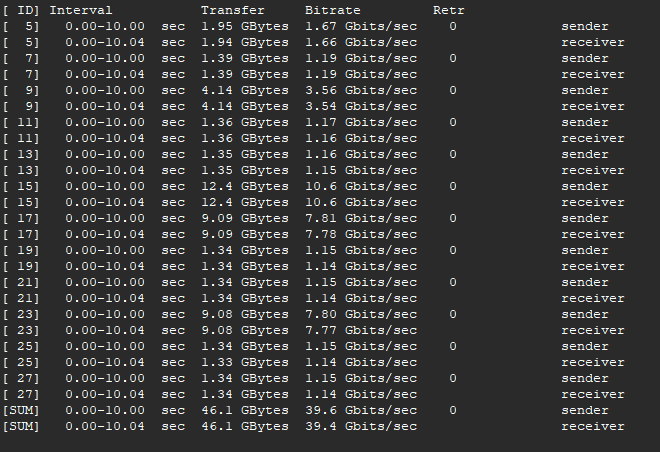
39.6Gb/s. Aw… the sweet sweet nectar of success! And how about this:
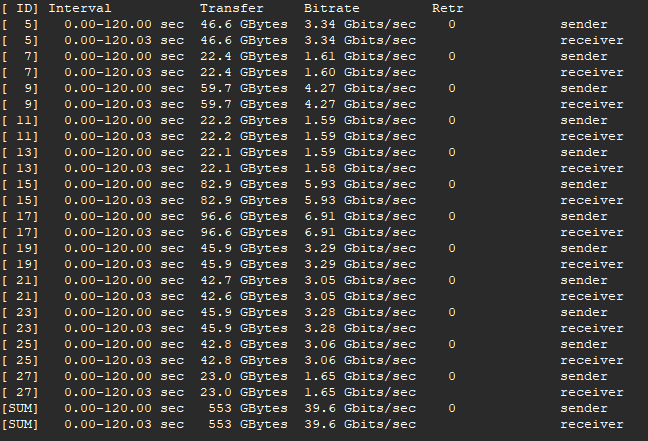
Two full minutes at 39.6Gb/s with no retries, no buffer issues. That’ll help me sleep tonight. But “wait” I hear you say… doesn’t that switch and those NIC’s support 56Gb/s? Why yes they do:
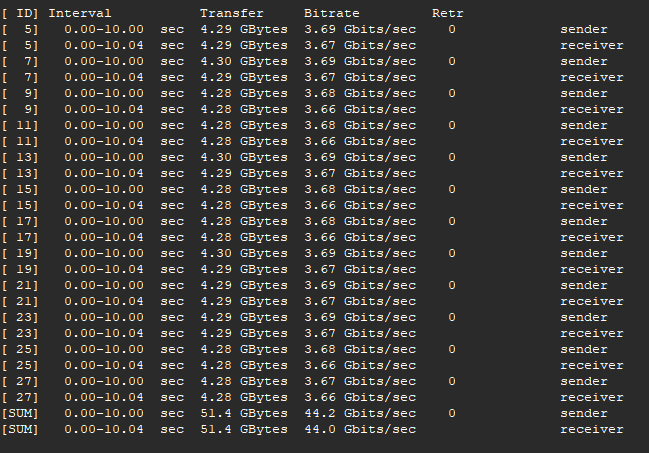
But this much throughput is a struggle for my setup. It was not consistent, IE: the results were very bursty and more/less streams didn’t improve this. And for a long test it just gets slower and slower with each pass. After quite a bit of fiddling it is doubtful that I’d be able to get more than 44Gb/s reliably. So I’m going to stay with the 40Gb/s setup where it can do it all day. Besides, I need to get onto building out my router rather than spend a lot of time trying to figure out the 56Gb/s optimizations.
But does any of this really matter? I suppose only if you have an application that can generate multiple concurrent streams. And then you would need a system at both ends that can actually handle this much data. This doesn’t really fit my current or foreseeable use case. Besides, this was mostly a can-I-even-do-it exercise since I bought a switch that was capable of 40GbE. However now that I see it’s possible, I’m thinking that I will connect my router to my main switch via 40GbE as it would allow for a few close to full rate 10Gb/s concurrent streams. This wouldn’t be a good scenario for connecting to the 5Gb/s or even 2Gb/s WAN that I plan to have, but will help for inter-VLAN routing, DNS processing, and any case where the end point is the router. And at some point, I’d like to replace my pedestrian NAS with something a bit better. That might be a good use case for 40Gb/s.
Thanks for taking the time to read. As always, comments and questions are welcome.
Comments
Loading comments…