

Buying a used enterprise switch on eBay can be an adventure. The two biggest issues (not problems) will be:
- Gaining access and resetting the password.
- Updating the software.
The SX1024 being 13-ish years old is no exception. You’re going to need patience and a serial console cable. And it wouldn’t hurt to find a copy of the 1U_HW_UM_SX10XX_SX1X00.pdf and any version of the MLNX-OS Ethernet Users Manual. I was able to find the 3.6.5009 version fairly easily. And did I mention you’re going to need a bucket full of patience.
Plugging the switch in and powering it up for the first time took about 8 minutes to boot to the point that the status lights said everything was “ok”. That’s a long 8 minutes as you wonder if you just bought a brick. Patience.
Next, breakout the serial console cable and try to access it that way as it is the most basic way to communicate with the SX1024. Check the User manual for details, and if you need further help on using a serial cable there are several YT videos you can find.
And yup… the password on my switch had not been cleared. But I didn’t really expect it to be. However, the hardware manual says:

But holding the Reset button for 15 seconds didn’t work. Reading a cryptic forum post (I forget where) hinted that a minute would be better. So I held the reset button for a minute… It worked! I was in, however it didn’t reset the password so the only way to get into the switch was to hold the reset button for a minute each time I wanted to get to the CLI. A walk through the MLNX-OS software manual and I find this:
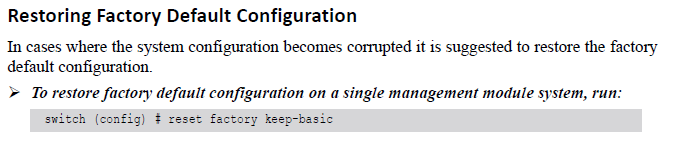
To run this, you have to be in config mode:
switch [standalone: master] > enable
switch [standalone: master] # configure terminal
switch (config) # reset factory keep-basic
And this worked. At the next reboot I’m greeted with the Configuration Wizard. Here you’ll set the switch’s name, the IP address for the management port (I suggest that you don’t use DHCP for the Management port), and your own password that someone else will have to figure out how to reset when you sell it on eBay in a few years. Hopefully they’ll read this to help them out. Check out the MLNX-OS Ethernet User Manual for details of the Configuration Wizard.
Thanks for taking the time to read. As always, comments and questions are welcome.
Comments
Loading comments…